Tessellator
Tessellator: A Visual Programming Language for Tessellation Patterns
Welcome to Tessellator, an interactive tessellation visual programming language where you can create complex geometric patterns through rule-based generation and manual manipulation. This project was inspired by Pattern Blocks mathematical manipulatives. See https://en.wikipedia.org/wiki/Pattern_Blocks
How to Use
On the left, there are instruction cards. You start with 4 cards:
1. Start - Blank canvas initialization
2. Manual Placement - Allows you to manually place blocks
3. Rules - Define rules on what shapes to place on what edges. You can also specify the number of iterations/generations to run the rules for
4. End - The end of the program
Controls
There are controls at the top of the left column:
- Previous - Go back one generation
- Next - Go forward one generation
- Go Start - Go back to the start card (blank canvas)
You can also click on any card to go to that generation and edit it.
Card Management
- Right-click to add a new Manual Placement or Rules card
- Drag and drop cards to reorder them
- If you want to start over, just reload the browser window
Manual Placement Card
- Press 1-6 or press buttons to create shapes. Follows your cursor on the canvas. Click to place. Press Escape to cancel
- Placement close to another shape edge should auto-snap it into place
- Press spacebar to place the same shape again. Press spacebar again to change to the next shape
- Select a shape and press Delete or Backspace to delete it
Rules Card
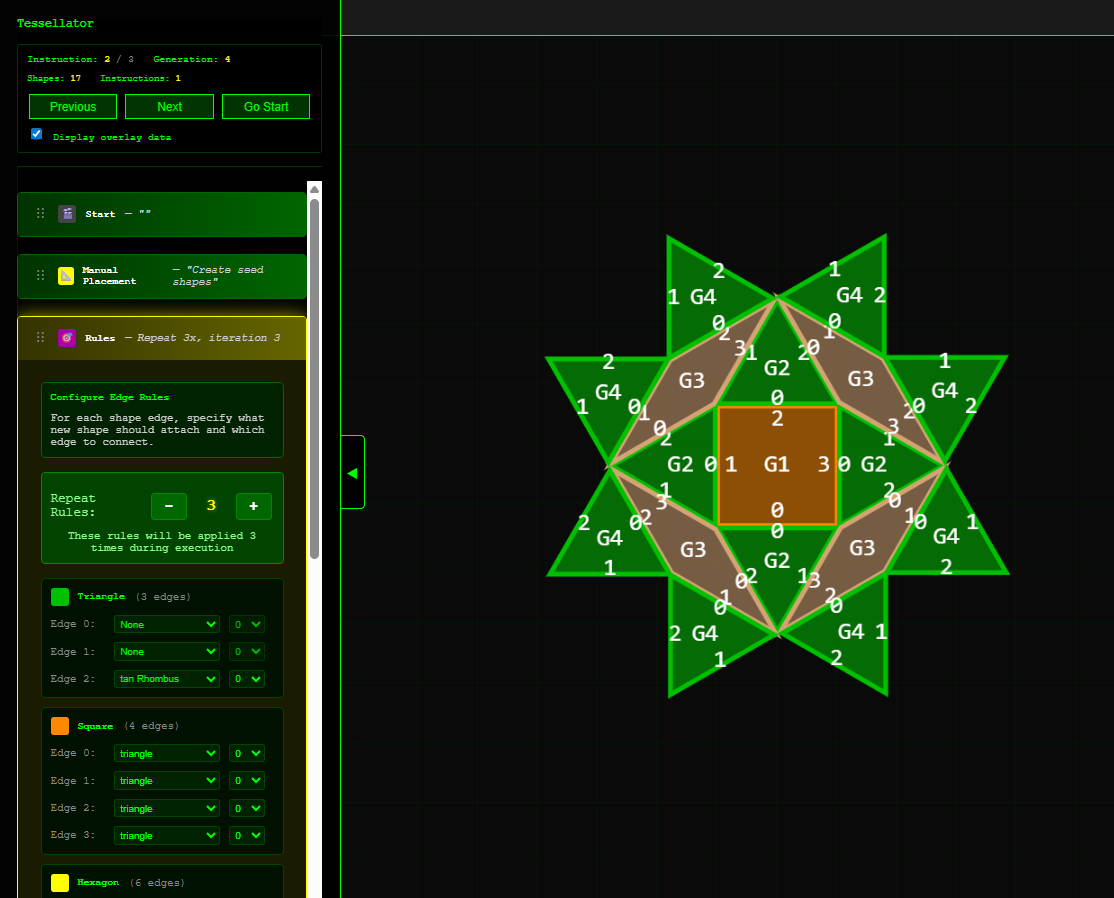
Rules work on the shapes added in the last generation.
By default, the generation number is displayed on the shapes along with their edge numbers. You can turn this overlay off with the "Display overlay data" checkbox in the main controls area.
You can define what shapes to put on the edges of existing shapes and which edge to connect.
You can update the number of times the rule should be repeated. You need to press the "Next" button to go to the next iteration.
Current State
Functional, but it does need some cleanup. There are more features I want to add.
Originally, the plan was to make this a game. You would be given the outline of a tessellation, and you would try to use the minimal number of instructions to match it. Lower scores are better (like golf). Perhaps there would be a par for each template shape.
Use of AI
Heavy use of AI for coding help, mostly using Claude Code. This allowed me to write this directly in JavaScript and helped me experiment with ideas faster and iterate. However, this ended up being challenging in the end because Claude does a terrible job cleaning up legacy code and likes to keep it around. So in the end, I really had to manually clean up the code and cut functionality out to get a working subset in time for the deadline.
Github Link
Leave a comment
Log in with itch.io to leave a comment.